Loading…
TS-SYS-05 // COMMODORE 128 · BASIC v7.0 · VIC-IIe

C-128 WorkSpace

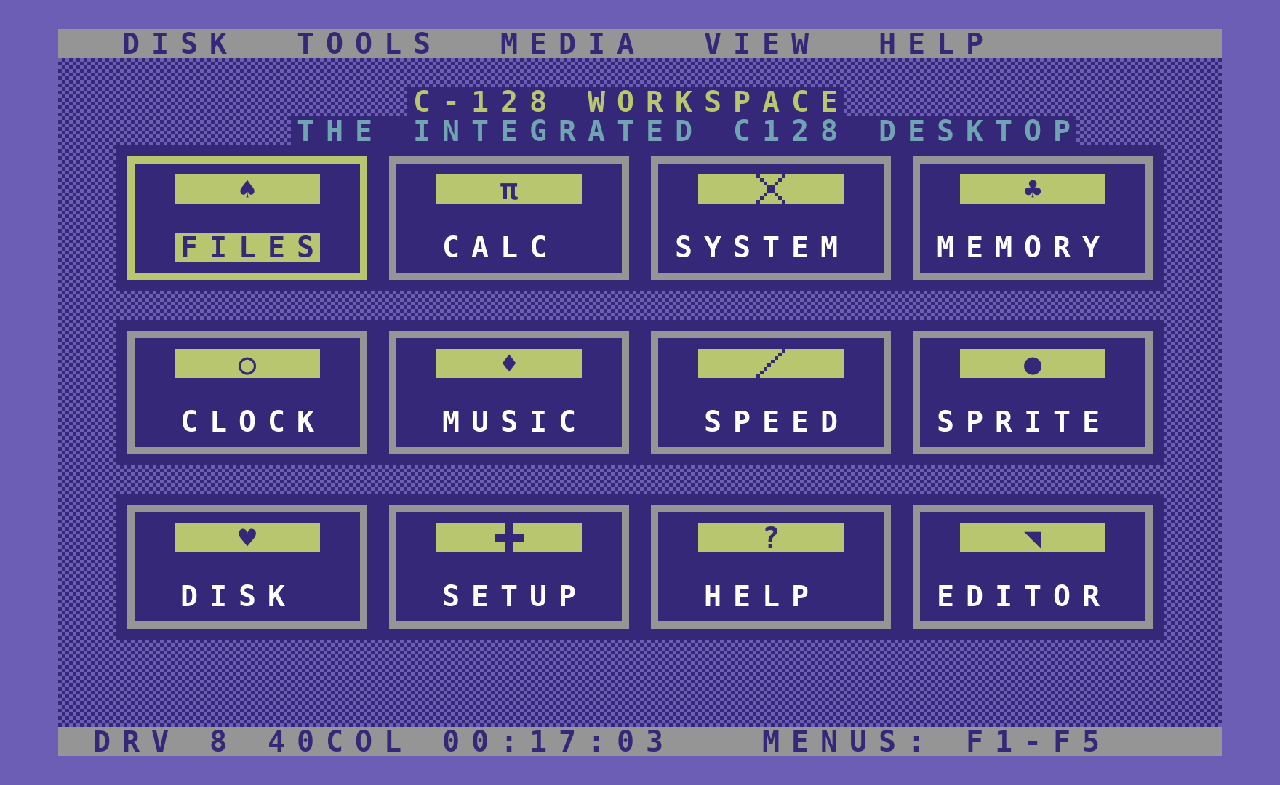
C-128 WorkSpace is a graphical desktop for the Commodore 128, written entirely in BASIC v7.0. A menu bar, twelve tools behind twelve PETSCII icons, windows with shadows, dialogs, three themes and a textured ground — on a 1 MHz VIC-IIe, in forty columns, with no REU, no 80-column monitor and not one bitmap. It draws by POKEing screen codes straight into screen and colour RAM, and it boots in about three seconds.

← BACK TO SYSTEMS
A desktop the C128 never got. In BASIC.
v1.0 · NOT PUBLIC YETCommodore 128 · BASIC v7.0VS GEOS 128
12TOOLS · 40 COL
17APPS · 80 COL
~3sCOLD START
~190ML BYTES
FREE WHEN IT SHIPS
commodore1902A
THE DESKTOP · 40 COLUMNSTwelve tools, Classic Blue, checker ground · the screen the disk blits at boot
SWITCH CHANNELS TO SEE MORE
01 // WHAT IT IS
The system, no marketing
DESKTOP · COMMODORE 128

The C128 shipped with more machine than anyone gave it software for: an 8502, 128 KB, two video chips and a BASIC good enough to write real programs in. What it never got was a desktop that felt like one. GEOS was the C64's, and it wanted a mouse and time. WorkSpace is the other answer — keyboard and joystick, forty columns, instant.

The rule the whole thing is built around: the 40-column desktop is the mandatory primary UI, and it must run on a stock machine. No REU, no 80-column display, no bitmap assets, no cartridge, no modern libraries, no assumed mouse. If a C128 straight out of its box in 1985 cannot run it, it does not ship.

There is a second edition for people who do have the 80-column monitor — WorkSpace OS 128 v2.1, on the VDC at 2 MHz, with a two-pane launcher and seventeen applications. It shares the tools' logic with the 40-column desktop and changes only the presentation layer, which is the point of splitting them: the renderer, the theme manager, the dialog manager and the disk service are replaceable layers, so the interface can be rewritten without touching a single tool.

A desktop for a machine that never got one — forty columns, one megahertz, and it opens in three seconds.
02 // WHAT IT DOES
What you can do with it
8 CAPACIDADES
/01

TWELVE TOOLS

files (a disk browser that runs, views, copies, renames and deletes) · calc · system (CPU, MMU and VDC report with a colour bank map) · memory (hex viewer) · clock · music (SID) · speed (1 vs 2 MHz benchmark) · sprite (a 24×21 editor that writes with SPRSAV) · disk (DOS status, validate, rename, format) · setup · help · editor (a line-based SEQ text editor that loads and saves to disk).

/02

DROPDOWN MENU BAR

F1 to F5 open Disk, Tools, Media, View and Help; cursor keys or the joystick move, RETURN picks, ←/→ switch menus, ESC closes. The menus are a data-driven registry, so a new item is one line of DATA.

/03

JOYSTICK OR KEYBOARD

The launcher highlight moves with the cursor keys or a joystick in port 2, and only the two tiles that changed repaint — the one you left and the one you landed on.

/04

THREE THEMES, FOUR GROUNDS

Classic Blue, Dark Terminal and Light GEOS, each one a line in the theme manager. The desktop texture is checker, dots, mesh or plain, and the icons are plates or flat. All of it switches live in Setup.

/05

A REAL WINDOW STACK

Windows are drawn as shadow, frame and title by one primitive, and every dialog — alert, confirm, input, error — comes out of the same four routines. Leaving a tool restores the desktop underneath instead of redrawing it.

/06

EIGHTY-COLUMN EDITION

WorkSpace OS 128 v2.1 on the VDC at 2 MHz: a scrollable applications list of colour icon chips beside a live information panel, a clock that keeps ticking while you browse, and seventeen apps including a PETSCII character map and a dec/hex/binary converter.

/07

STATUS BAR

Drive number, the video mode it detected by peeking 215, and a running clock.

/08

A DISK THAT BOOTS ITSELF

c128-apps.d64 opens on a boot menu as its first file, so a cartridge's mount-and-run lands straight on it: press 1 for the desktop, 2 for the 80-column workspace.

03 // THE ACTUAL SCREENS · NOT MOCK-UPS
Drawn from the bytes the disk blits
Rendered from DESKSCR/DESKCOL and WSSCR/WSATR — the screen-code and colour dumps the programs load at boot
04 // ARCHITECTURE
How it's built inside
INTERNALS
01

POKE, NOT PRINT

The renderer writes screen codes and colour straight to 1024 and 55296. Five primitives — string, character, box, fill, window — are the whole drawing surface, and every tool is built on them, so a change to the look is a change in one place.

02

THREE 6502 HELPERS AT $1300

Hand-assembled fill, save and restore routines live in the documented C128 free-RAM block. Fill floods all 1000 screen cells and 1000 colour cells in one SYS; save copies the finished desktop to a buffer; restore blits it back. They touch only screen RAM, colour RAM and their own buffers below the BASIC program.

03

DECLARE EVERY SCALAR BEFORE DIM

C128 BASIC keeps scalars first and arrays after, so creating a new scalar once the arrays exist shoves the whole array block up to make room — and the desktop dimensions about 7 KB of arrays. The palette routine alone measured four seconds of that. Predeclaring every variable before DIM took the cold start from ~31 s to ~22 s.

04

THE LAUNCHER IS LOADED, NOT DRAWN

The remaining time was painting twelve framed tiles cell by cell, and that screen never changes — so it is captured once and blitted. Three companion files carry the ML helpers, the screen-code image and the colour image; boot BLOADs them and runs restore. Cold start fell to about three seconds.

05

A STALE CAPTURE IS REJECTED, NOT SHOWN

Each captured image carries a version byte and a checksum. Boot checks the loads landed and that the version matches the one baked into the program; if a file is missing, a load fails or the version disagrees, it falls through to the original BASIC draw. A disk without the images still boots — just at the old speed.

06

REPAINT ONLY WHAT MOVED

The same idea inside the tools, in pure BASIC: the file browser and the text editor used to rebuild all sixteen visible rows on every cursor press. They repaint the two rows that actually changed, and re-read the disk only when something on it changed.

// HOW YOU CHECK A PROGRAM THAT PREDATES YOUR TOOLS
Tokenized, disassembled and booted before anyone calls it done
BASIC v7.0 has no compiler to catch you, so the checks are external — and the machine code is re-derived rather than trusted.
01

petcat round-trip

The source is tokenized with VICE's petcat at BASIC v7.0 and round-trips byte for byte, which is what proves every token is legal and nothing was invented.

02

Static BASIC audit

No dangling jumps, no two-character variable collisions, no writes to reserved variables — the kind of thing that only shows up three menus deep, months later.

03

The machine code, re-derived

The three 6502 helpers are assembled again by an independent assembler in the build checks and compared against the bytes in the DATA statements, so a typo in a hex digit cannot ship.

04

Booted on real ROMs

Both programs are run in VICE with genuine C128 ROMs and confirmed to reach their desktops: the 40-column launcher and the 80-column WorkSpace splash.

SPECIFICATIONS · Full spec sheet
MACHINE
Commodore 128 in C128 mode · 8502 · 128 KB
VIDEO
VIC-IIe 40 columns at 1 MHz · VDC 80 columns at 2 MHz for the second edition
STORAGE
1541 · 1571 · 1581 · SD2IEC · flash cart with a mounted D64
INPUT
Keyboard · joystick in port 2 · no mouse assumed
LANGUAGE
BASIC v7.0, legal tokens only · three hand-assembled 6502 routines
REQUIRES
Nothing else. No REU, no 80-column monitor, no cartridge, no bitmap assets
BUILD
petcat -w70 (VICE)
COLD START
~3 s in VICE, down from ~31 s
// WHAT THE MACHINE WILL ACTUALLY DO
The constraint is a stock C128, and it never moved
Every speed-up here came from asking what the 8502 was really spending its time on — the array block shifting under a new variable, twelve tiles painted cell by cell — rather than from asking for more hardware.
THE RULEStock

A C128 as it came in the box. No REU, no 80-column display for the primary UI, no cartridge, no mouse.

LANGUAGEBASIC v7.0

Legal tokens only, proven by tokenizing with petcat. The 6502 helpers are bytes in DATA, so no assembler is needed to build it.

FALLBACKAlways

Every accelerator checks itself and drops to the slow path rather than paint the wrong screen. Nothing can end up half-drawn.

CREATED BYDave Abellán

Tombatossals Softworks LLC.

CREATED BY · Dave Abellán
05 // STATUS & ROADMAP
Where it is and where it goes
4 EDICIONES
v1.0TODAYThe 40-column desktop with its twelve tools, three themes and four grounds, plus WorkSpace OS 128 v2.1 on the VDC with seventeen apps. Both boot from c128-apps.d64 behind a menu, both blit their launcher rather than draw it, and both were run in VICE on genuine C128 ROMs.
v2.1The 80-column editionThe VDC side was rebuilt around a two-pane launcher — a scrollable applications list beside a live information panel — and gained a PETSCII character map and a base converter, taking it to seventeen apps.
THE AUDITTwo real bugsThree menu entries were showing garbage because the name DATA ran out and READ spilled into the SID music notes; and the CPU benchmark reused the variable holding the theme background colour as a scratch timer, so running it left a bad COLOR behind and crashed the next redraw. Both found by reading, both fixed.
NEXTReal ironThe 6502 helpers have been verified statically against the C128 memory map and run in VICE, but not yet on a real machine in this environment. That is the open item, and it is where a corrupt redraw would be looked for first.
// AVAILABILITY
40-COLUMN DESKTOP · PRIMARY80-COLUMN WORKSPACE OS v2.1LEGACY 40-COL SUITE (ES)BOOT MENU ON ONE D64
06 // QUESTIONS
Reasonable doubts
6 PREGUNTAS

Not yet. The repository is private, so there is no public disk image and no public source today. When that changes this page will carry the link — until then, everything described here is described, not offered.

// SIGUIENTE SISTEMAChumOS16-BIT · AMIGA · VS Workbench
CHANNEL #0x4C7A · ON AIRREC ● TC 02:47:18SIGNAL ▮▮▮▮▮ 100% · AES-256
TRANSMISSION · ENCRYPTED// SUBSCRIBE

Subscribe to the encrypted channel.

Devlogs, patches and internal leaks. Zero spam, zero analytics. Just what matters, when it matters.

9DEVLOGS PUBLISHEDSINCE 2025
2LANGUAGESES · EN
0SPAM · TRACKINGEVER
// AGENT_INTAKEv3.07
JOIN DISCORD
OPENING YOUR MAIL CLIENT · confirm the send
CIFRADO100%
PRIVACIDAD100%
FRECUENCIA2-3/MES
// AES-256// 0 ANALYTICS// REPLY TO LEAVE// HOSTED IN VIRGINIA
// SIGNED · PRINCETON · ILLINOIS · 2025▮ ▮ ▮ ▮ ▮ ▮ ▮ ▮ ▮ ▮ ▮ ▮ ▮ ▮ ▮ ▮ ▮ ▮ ▮ ▮ ▮ ▮END_OF_TRANSMISSION_◆