START-STYLE LAUNCHER
A Start menu with a glossy header, icons and full keyboard navigation (Esc / Ctrl+Esc, arrows + Enter). No mouse required if you do not want one.
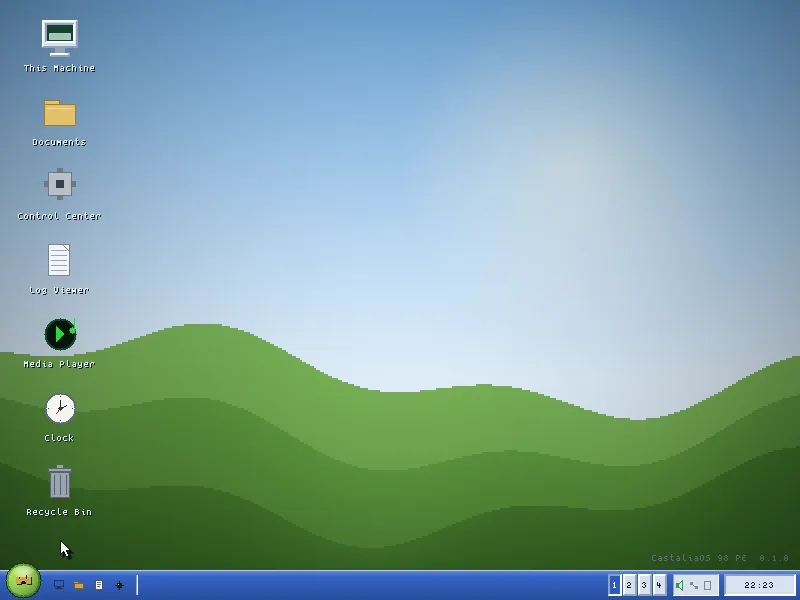
CastaliaOS 98 PE ("Powerful Edition") is an original desktop inspired by late-90s computing — beveled buttons, glossy title bars, a Start menu, an Explorer with a friendly blue task pane — written from scratch in portable C89. It boots on FreeDOS as a 32-bit flat protected-mode program hosted by DOS/4GW. No Microsoft code, artwork, or branding anywhere in it.
The desktops of the late 90s had a particular magic: instant, tactile, legible. Beveled buttons you could almost press. A Start menu. A file explorer with a friendly blue task pane. You always knew where you were. CastaliaOS began as a simple question — could you build that feeling from scratch, legally clean, inside a period machine’s budget? — and turned into 18,462 lines of C.
Rather than mod an existing OS or theme a modern one, CastaliaOS is written from the platform layer up in portable C89. A strict rule shaped everything: nothing above the platform layer may touch the hardware. That single constraint makes it portable — the same stack compiles under gcc and clang against a headless backend — and disciplined: every subsystem has a clean _init / _shutdown pair and is tested in isolation. 457 unit checks run on modern Linux, with no DOS and no emulator, in seconds.
The entire UI composites into one 32-bit XRGB back buffer in system RAM; only the present() step converts the dirty rectangles down to the real hardware depth — a 3-3-2 palette at 8bpp or RGB565 at 16bpp. The result: glossy chrome, drop shadows and animations that still fit inside the budget of a Pentium II with 4 MB of VRAM.
Every pixel, every window, written by hand — and when something does not exist yet, the system itself opens a window to tell you.
A Start menu with a glossy header, icons and full keyboard navigation (Esc / Ctrl+Esc, arrows + Enter). No mouse required if you do not want one.
Switch instantly with Ctrl+Left/Right; windows keep their state and geometry, and a 1-2-3-4 pager lives in the taskbar. Plus window snapping and tiling — something Windows 98 SE never had.
A navigable address bar, a blue task pane (File and Folder Tasks / Other Places / Details), drag-and-drop with a floating ghost, a two-pane commander mode and a safe delete-to-Trash. The Find button runs a genuinely recursive name search: it walks down through subdirectories and hands back up to 128 matches with their relative paths.
File Manager, Notepad, Calculator, Log Viewer, Control Center, Task Manager, Paint-lite, Viewer (BMP + hex dump), System Information and Mines. Ten windows that open code, not mockups.
The system ships app_planned_open(): press an entry that is not implemented yet and a window opens telling you which phase it is scheduled for. We would rather show an honest notice than a fake feature — and that rule governs this page too.
Castalia Classic, Storm Gray, Forest Green, High Contrast and Aurora (XP), a glossy blue built from a 100% original palette. The whole environment recolors live; the 16-color EGA mode is one INI line away.
Packages with CRC-32 and a defensive validator, discovered at boot and executed behind a versioned ABI (CappHostApi). The release folder ships two sample add-ons you can read: HELLO and CLOCK.
A fatal error writes a crash record and leaves a boot-dirty flag; if boot fails twice, CBOOT offers a high-contrast recovery profile. Settings live in a plain-text CASTALIA.INI you can repair from DOS with any editor.
Platform → System → Graphics → Window Manager → UI Toolkit → Shell → Apps. Only the platform layer touches the machine (VESA/VBE, mouse via INT 33h, keyboard via INT 16h), and it does so behind a single header — plat.h — with two interchangeable implementations: the DOS backend and a headless host.
Clipped primitives, Win9x bevels, gradients, drop shadows, color-keyed blitting, a BMP codec and bitmap fonts. Composites into a 32-bit XRGB back buffer and presents dirty rectangles at 3-3-2 (8bpp) or RGB565 (16bpp), with no dithering and no per-pixel alpha anywhere in the system.
A fixed pool of top-level windows, z-order, focus, non-client frames, four virtual desktops and snapping. The toolkit: buttons, checkboxes, radios, list boxes, menus, a text edit control and modal dialogs, all hand-written.
Add-ons packaged with CRC-32 and discovered at boot; valid ones are indexed and appear in the launcher. Their code runs behind a versioned ABI (CappHostApi) without touching the shell or the hardware.
Every portable source goes through tools/c89_lint.sh with Watcom-style rules, so the DOS build never breaks on a gcc extension.
Safe strings, rectangles and regions, INI, 3-3-2/565/EGA-16 color packing, the BMP codec, snapping, the clipboard, the network parser, the .CAPP loader and Mines logic. 457 checks, 0 failures.
Every push builds with both compilers, runs the tests, renders the desktop headlessly and uploads the resulting BMP as an artifact you can inspect.
A dedicated CI job really compiles with Open Watcom and produces CASTALIA.EXE, CBOOT.EXE and INSTALL.EXE: a 32-bit protected-mode binary hosted by DOS/4GW that boots on FreeDOS under QEMU.
The whole stack — renderer, window manager, toolkit, shell and apps — is original. It is 18,462 lines of C: you can read it in a weekend.
No code, artwork or branding. It is a tribute to the aesthetic, not a copy of a product.
DOS4GW (the extender), the Tango icons (Public Domain) and the Spleen font (BSD-2). Both assets are optional: one INI line puts you back on 100% original art.
No third-party runtime dependencies. Settings in a plain-text CASTALIA.INI you can repair from DOS with any editor.
Neither, exactly. It is not a skin on a modern OS: it is a complete from-scratch graphics stack — software renderer, window manager, toolkit, shell and ten applications — in 18,462 lines of C89. But it is not a kernel either: it runs as a 32-bit protected-mode program on FreeDOS, hosted by the DOS/4GW extender. The native kernel does exist, in /kernel-lab, as explicitly separate research.
Devlogs, patches and internal leaks. Zero spam, zero analytics. Just what matters, when it matters.